Socket shapes and the socket hover highlight
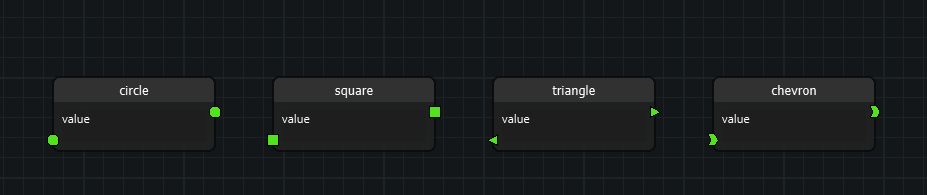
Sockets are not fixed to a circle dot. A node declares, in code, which shape each of its sockets is drawn with, and applications can register shapes of their own.
- Shapes live in code, never in the graph file. The node owns the shape,
so
Socket.serialize()is unchanged and old files keep loading. - A shape decides two things: how the socket is painted, and which area of it counts as a hit. What you see is what you can click.
Usage
Declaring shapes on a node
Every node has two maps, one per side, keyed by socket type. A node that says nothing keeps the classic circle.
from nodeeditor.node_node import Node


class MyNode(Node):
    def initSettings(self):
        super().initSettings()
        # input sockets: type 1 is a chevron, everything else a triangle
        self.input_socket_shapes = {1: "chevron", "*": "triangle"}
        # output sockets: every type is a square
        self.output_socket_shapes = {"*": "square"}
The lookup is: the side's own map, then its "*" wildcard entry, then the
circle. A name that is not registered draws as the circle rather than breaking
the graph.
The two sides are independent, so the same socket type can look different on the input and the output side of one node.
The presets
| Name | Shape | Notes |
|---|---|---|
circle |
filled circle | the default |
square |
square | half side 0.85 * radius |
triangle |
triangle | points away from the node: right on an output, left on an input |
chevron |
concave hexagon | never mirrors; the tip points right on both sides |
The chevron reads as left-to-right data flow - in, processed, out - so it keeps pointing right on an input socket, where its tip aims into the node.
Registering your own shape
A shape is a SocketShape subclass describing its outline as points
normalized against the socket radius:
import math
from nodeeditor.node_socket_shapes import SocketShape, register_socket_shape


class HexagonShape(SocketShape):
    def points(self):
        return [(math.cos(math.radians(60 * i)),
                 math.sin(math.radians(60 * i))) for i in range(6)]


register_socket_shape("hexagon", HexagonShape())
A plain drawing callback works too. A callback only knows how to draw, so its hit area falls back to the circle:
from qtpy.QtCore import QRectF


def draw_pill(painter, ctx):
    painter.setBrush(ctx.brush)
    painter.setPen(ctx.pen)
    painter.drawRoundedRect(
        QRectF(-ctx.radius, -ctx.radius * 0.6,
               2 * ctx.radius, 2 * ctx.radius * 0.6),
        ctx.radius * 0.6, ctx.radius * 0.6)


register_socket_shape("pill", draw_pill)
ctx carries the painter, the radius, the center, the brush, the
pen, the color, the socket, the hovered flag and the direction
(+1 on an output socket, -1 on an input socket). Use the QRectF overload
of drawRoundedRect; the float overload of the rectangle arguments is not
available in PyQt6.
Register the shape before the node that uses it is created: the node resolves the name when the socket is built.
The hover highlight
Hovering a socket lights it up with the theme's socket highlight color
(scheme.sockets.highlight, #FF37A6FF by default). It is a visual change
only - no tooltip, no signal.
The hover state is a separate hovered flag on the graphics item, so it never
fights the highlight the edge snapping sets while dragging an edge:
socket.grSocket.hovered        # True while the mouse is over the socket
socket.grSocket.isHighlighted  # True while the socket is snapped to an edge
A socket lives inside its node's hit area, so Qt reports the node as hovered too. The node holds back its own hover outline while one of its sockets is highlighted: hovering a socket lights the socket, not the node. Hovering the node's body still lights the node, as before.
How it works
nodeeditor/node_socket_shapes.pyholds theSocketShapebase class, the four presets and the registry (register_socket_shape,get_socket_shape,SOCKET_SHAPES). The registry accepts aSocketShapeinstance, aSocketShapesubclass, or a plain callable.Node.getSocketShapeName(socket_type, is_input)resolves the name from the side's map.Socket.__init__asks the node for it before the graphics item is built, so sockets created while deserializing a graph get the same shapes as sockets created normally.QDMGraphicsSocketdelegates painting to the shape, returns the shape's outline fromshape()(the hit area) and grows its bounding rectangle to cover the outline and the widest pen.- The socket label stays centered inside the socket and is clipped to the shape, so it never spills outside the outline. On a thin shape such as the triangle or the chevron it can be hard to read.
Socket.changeSocketType()re-resolves the shape, so a socket that changes type also changes shape, following the same map.
Behavior change
A socket's hit area used to be its square bounding rectangle; it is now the shape that is drawn. Clicking the corner of a circle's bounding box no longer starts an edge drag from that socket. Clicking the socket itself is unaffected.