Edge labels (code-set, user-read-only)
Edges support a short text label drawn centered on top of the edge path.
- Not user-editable. The label is a
QGraphicsSimpleTextItemchild ofQDMGraphicsEdgewithItemIsSelectable/ItemIsMovable/ItemIsFocusableunset andacceptedMouseButtons() == Qt.NoButton.QGraphicsSimpleTextItemhas no editing API at all, so users cannot change it from the view. - Code can set it at creation time and at runtime.
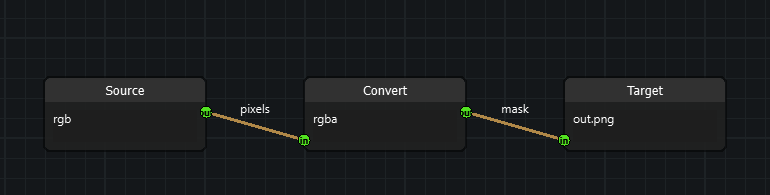
Usage
from nodeeditor.node_edge import Edge

# creation time
edge = Edge(scene, out_socket, in_socket, label="yes")

# runtime (equivalent)
edge.label = "no"
edge.setLabel("no")
assert edge.label == edge.getLabel() == edge.grEdge.label()

# styling (optional)
edge.grEdge.setLabelColor("#ffffff")
edge.grEdge.setLabelFont(my_qfont)
edge.grEdge.setLabelOffset(0, -18)  # px offset from path midpoint

# hiding
edge.setLabel("")
How it works
Edge(label=...)forwards toQDMGraphicsEdge.setLabel()after the graphics item is created (nodeeditor/node_edge.py).QDMGraphicsEdge.labelItemis recentered inupdateLabelPosition()usingpath().pointAtPercent(0.5)(fallback: source/destination midpoint) plus the label offset. It is called frompaint()aftersetPath(), so the label follows node drags, reroutes, and collapsed-group stub positions with no extra signals (nodeeditor/node_graphics_edge.py).boundingRect()unions the path rect with the label rect so the label is not clipped.shape()stays path-only, so cut-line / intersect / hover behavior is unchanged.
Persistence
Edge.serialize()stores'label';Edge.deserialize()restores it withdata.get('label', ""), so old files without the key load as"".- Clipboard (
Edge(self.scene)+deserialize) and file save/load round-trip the label automatically.