Ordered multi-input nodes (MultiInputNode)
A regular Node input socket accepts one edge (input_multi_edged =
False). A MultiInputNode (nodeeditor/node_multi_input_node.py) is a
Node whose input socket accepts any number of edges and reads them
in an explicit order:
- by default, the order the edges were connected in;
- changeable at any time from code (
Edge(..., input_index=n)at connection time, orsetEdgeOrder/moveEdgeTo/swapEdges/ ... afterwards) and from the calculator example's right-click menu; - visible on the canvas as
#1,#2,#3, ... edge labels; - persisted in the graph file, so it survives save/load, copy/paste and undo/redo.
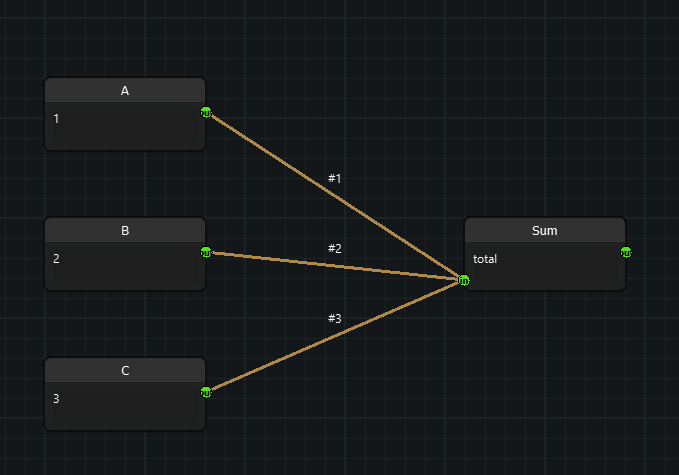
from nodeeditor.node_multi_input_node import MultiInputNode

class Sum(MultiInputNode):
    def __init__(self, scene):
        # one input socket accepting many edges, one output
        super().__init__(scene, "Sum", inputs=[2], outputs=[1])

    def evalImplementation(self):
        return [sum(v for v in self.getOrderedValues() if v is not None)]
Concepts
Edge.input_index — the per-edge order number
Every Edge carries input_index: its 0-based read position on its end
(input) socket (nodeeditor/node_edge.py). 0 is read first. -1 means
"not attached to an input" and is also the append-at-end default, i.e.
read last.
edge = Edge(scene, out_socket, node.inputs[0])                # appended -> read last
edge = Edge(scene, out_socket, node.inputs[0], input_index=0) # inserted -> read first
The value is owned and compacted by the input socket (below); assign it
directly only together with compactEdgeOrder(). Output sockets are never
ordered — attaching an edge as an output end resets it to -1.
Socket ownership and compaction
An input Socket keeps its edges in read order and rewrites 0..n-1 onto
them after every add/remove (nodeeditor/node_socket.py: addEdge,
removeEdge, _reindexEdges, orderedEdges). Consequences:
- connecting appends (connection order preserved automatically);
- removing closes the gap (no holes, positions always valid);
Socket.orderedEdges()is the read order; rawSocket.edgesis kept in the same order by the compaction above.
Connection order vs manual order
There is only one order, with two ways to set it: new edges default to the end (connection order), and any reorder call rewrites it from then on. No mode switch is needed.
Reading the inputs
All methods take an optional socket index defaulting to
multi_input_socket (see below).
| Method | Returns |
|---|---|
getOrderedEdges() |
[Edge, ...] in read order |
getOrderedSources() |
[(node, socket), ...], one entry per edge — a source connected twice appears twice |
getOrderedValues() |
[evaluated, ...], one entry per edge; a source that fails to evaluate contributes None instead of raising |
getOrderedNodes() |
[Node, ...] in read order |
describeInputOrder() |
"0: Input [out 0]\n1: Add [out 0]" — handy for tooltips and logging |
Changing the order
All reorder methods return True when the order actually changed, and on
success mark the node and its descendants dirty so they re-evaluate.
node.setEdgeOrder([edge_b, edge_a])   # partial lists keep the rest in place
node.setEdgeOrderByNodes([node_b, node_a])
node.moveEdgeTo(edge, 0)              # absolute position
node.moveEdgeBy(edge, -1)             # relative shift, clamped at both ends
node.swapEdges(edge_a, edge_b)
node.reverseEdgeOrder()
node.compactEdgeOrder()               # only needed after raw input_index assignment

# raw assignment also works, but must be followed by compaction
edge.input_index = 5
node.compactEdgeOrder()

# introspection
node.getMultiSocket()                 # the ordered input Socket (or None)
socket.edgeIndex(edge)                # read position, or -1 if not connected
Subclassing
MultiInputNode deliberately defines no __init__, so it mixes into an
existing node hierarchy without touching its constructor chain:
Two class attributes control the shape:
| Attribute | Default | Meaning |
|---|---|---|
multi_input_all_inputs |
True |
every input socket accepts many edges |
multi_input_socket |
0 |
with multi_input_all_inputs = False, the single input socket that accepts many edges (other inputs stay single-edge) |
class Merge(MultiInputNode):
    multi_input_all_inputs = False
    multi_input_socket = 1      # only inputs[1] is ordered/multi
Implementation notes:
initSettingsturnsinput_multi_edgedon (all inputs, or the one socket trimmed ininitSocketswhen not all).onEdgeConnectionChangedcompacts the order and refreshes the#Nlabels after every connection path (drag, reroute, remove, paste), because they all call this hook.onInputChangedis intentionally not overridden, so subclass chains such asCalcNode.onInputChanged(dirty-mark + eval) keep working untouched.
Order labels (#1, #2, ...)
When show_input_order_labels is True (the default), every edge on the
ordered input is labeled #1, #2, ... — the 1-based display of its read
position. Labels are written on every connection change and every reorder,
compacted on removal, and cleared when an edge detaches (only when the
label still matches the #N pattern, so a custom label you set from code
survives disconnects). Customize per class:
node.orderLabel(0)              # "#1" (staticmethod, override for custom text)
node.updateInputOrderLabels()   # backfill after re-enabling the flag
One caveat, shared with eval/dirty-marking in this codebase: labels are
applied in onEdgeConnectionChanged, which the view (EdgeDragging,
EdgeRerouting, Edge.remove) calls for you. If you connect nodes purely
from code with Edge(scene, out, node.inputs[0]), send the same
notifications a drag would, then read the labels:
edge = Edge(scene, out_socket, node.inputs[0])
node.onEdgeConnectionChanged(edge)   # like EdgeDragging does
assert edge.getLabel() == "#1"
Worked example: Sum
examples/example_calculator/nodes/multi_input.py (CalcNode_Sum,
registered as OP_NODE_SUM in examples/example_calculator/calc_conf.py)
sums every connected input in read order and shows the order in its
tooltip. Right-click menus in
examples/example_calculator/calc_sub_window.py expose reordering without
code:
- node menu (on a
MultiInputNodewith 2+ edges): Reverse Input Order, Move First Input to Last, Move Last Input to First; - edge menu (on an edge feeding such a socket): Move Input Earlier (read sooner), Move Input Later (read later).
All menu actions store an undo-history entry.
Persistence and compatibility
Edge.serialize()stores'input_index';Edge.deserialize()restores it withdata.get('input_index', -1)before attaching the sockets, so each edge inserts at its stored slot. Old files without the key load in file (connection) order — the same back-compat pattern as the'label'key (seedocs/EDGE_LABELS.md).- Because the number travels on the edge, the order survives save/load,
copy/paste, and undo/redo even when the file's
"edges"array is shuffled. - Clipboard paste and history snapshots go through the same
Edge/SocketAPIs, so no extra handling was needed. - Rerouting onto a multi-edge input keeps the socket's other edges
(
nodeeditor/node_edge_rerouting.py); rerouting onto a single-edge input still replaces, as before. A rerouted edge is treated as a new connection on the target socket (appended).
Socket-level API (without MultiInputNode)
The ordering machinery lives on Socket and works for any multi-edge
input, no subclass required:
socket.orderedEdges()          # read order
socket.edgeIndex(edge)         # position or -1
socket.compactEdgeOrder()      # re-sort + renumber, returns changed?
socket.setEdgeOrder([...])     # partial lists allowed, foreign/dupes skipped
socket.moveEdgeTo(edge, pos)
socket.swapEdges(a, b)
Testing
tests/test_100_multi_input.py (27 tests, offscreen QApplication)
covers connection order, explicit numbering, gap compaction on removal,
all reorder operations, label sync/clearing/opt-out, input_index
serialization, order restoration from shuffled file order, old-file loading,
and a full scene save/load round-trip:
The connect() test helper mirrors EdgeDragging.edgeDragEnd by calling
node.onEdgeConnectionChanged(edge) after Edge(...) — see the caveat in
Order labels above.