Node Grouping — Complete Usage Guide¶
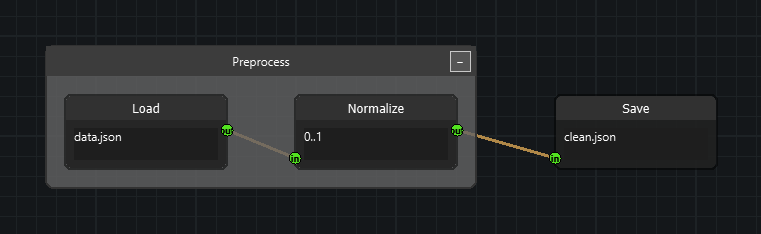
This guide covers the Group feature of qtpy-nodeeditor: how to create groups,
manage membership, collapse/expand, style, serialize, and integrate grouping into
your own application's menus, shortcuts, and context menus.
Import path:
from nodeeditor.node_group import Group(nodeeditor.node_group_node.GroupNodeis a backward-compatible alias.)
1. Overview¶
A Group is a pure visual container (QGraphicsRectItem + Serializable).
It is deliberately not a Node:
- No sockets, no evaluation, no
contentwidget. - It holds references to child nodes; nodes keep their positions, sizes, sockets, and edges at all times — collapsing only hides things, never resizes them.
- Logical
Edgeobjects are never mutated by grouping. When collapsed, only the graphics endpoints of external edges are rerouted to per-edge stub rows on the collapsed box. Internal edges (both ends inside) are hidden until expand.
Groups can be moved (children follow), collapsed/expanded, renamed/recolored, serialized (saved/loaded, undo/redo, clipboard), ungrouped (keep nodes) or deleted with children.
2. Quick start¶
import sys
from qtpy.QtWidgets import QApplication
from nodeeditor.node_editor_widget import NodeEditorWidget
from nodeeditor.node_node import Node
from nodeeditor.node_edge import Edge, EDGE_TYPE_BEZIER
from nodeeditor.node_group import Group

app = QApplication(sys.argv)
editor = NodeEditorWidget()
scene = editor.scene

a = Node(scene, "A", inputs=[], outputs=[1]); a.setPos(-200, 0)
b = Node(scene, "B", inputs=[1], outputs=[1]); b.setPos(0, 0)
c = Node(scene, "C", inputs=[1], outputs=[]); c.setPos(250, 0)
Edge(scene, a.outputs[0], b.inputs[0], edge_type=EDGE_TYPE_BEZIER)
Edge(scene, b.outputs[0], c.inputs[0], edge_type=EDGE_TYPE_BEZIER)

# Group.__init__ already registers with scene.groups AND the graphics scene.
group = Group(scene, title="My Group")
group.addNode(a)
group.addNode(b)
group.updateBounds()  # auto-fit the box around its children

scene.history.storeHistory("Created group", setModified=True)
editor.show()
sys.exit(app.exec())
3. Core concepts¶
| Concept | Rule |
|---|---|
| Single parent | A node belongs to at most one group (node.parent_group or None). addNode automatically removes it from its previous group. |
| No nesting | Groups cannot contain groups (addNode takes Nodes only). |
| No auto-remove | Dragging a node out does not eject it — the box grows/shrinks to follow (see §6). Removal is always explicit (Ungroup / Detach / Delete). |
| Z-order | Groups paint at z = -1, behind nodes, so child clicks hit children first. |
| Header vs body | Only the title bar is interactive (select, drag, collapse button, context menu). The expanded body is click-through: clicks, rubber-band, and right-clicks there behave exactly like plain canvas. The small collapsed box is fully clickable. |
| Selection | Clicking the header selects only the group (deselects everything else). Shift+click adds to the selection instead. |
4. Creating groups¶
4.1 Programmatically¶
group = Group(scene, title="Math", x=0, y=0, width=200, height=150)
group.addNode(node1)
group.addNode(node2)
group.updateBounds()
scene.history.storeHistory("Created group", setModified=True)
4.2 From the user's selection (needs 2+ nodes)¶
nodes = [item.node for item in scene.getSelectedItems() if hasattr(item, "node")]
if len(nodes) >= 2:
    group = Group(scene, title=f"Group ({len(nodes)} nodes)")
    for node in nodes:
        group.addNode(node)
    group.updateBounds()
    scene.history.storeHistory("Created group", setModified=True)
The built-in main window already does this: G groups the selection
(NodeEditorWindow.onGroupSelected). The calculator example exposes the same
via right-click → Group Selected Nodes (only shown when >1 node is selected).
4.3 Drag-and-drop¶
Dragging node(s) over a group highlights it (dashed gold border) and drops them
in on release — handled automatically by QDMGraphicsView + Scene.dropNodesIntoGroup.
No code needed. Dropping never removes nodes from their previous group membership
ambiguously: a node is moved into the new group (single-parent rule).
5. Membership¶
group.addNode(node)          # move into group (removes from previous group)
group.removeNode(node)       # detach, keep node; group keeps its size
group.getChildNodes()        # copy of the member list
group.contains(node)         # membership test
node.parent_group            # the Group or None
removeNode disconnects the positionChanged tracking signal and flags the
scene modified. Removing the last child leaves an empty box behind — delete it
explicitly if unwanted (group.ungroup() on an empty group just disposes it).
6. Moving and auto-fit¶
- Drag the title bar: the box and all children move together by the same delta (selected children are moved once — Qt's selection move and the group follower never double-apply). External edge stubs stay glued while dragging collapsed groups.
- Drag a child node:
node.positionChanged→Group.onChildMoved→updateBounds(), i.e. the boundary is recalculated on every child move (grows, shrinks, or shifts origin to tightly fit). Children themselves are never moved by a refit — only the box rect/position changes. - A plain header click (no drag) stores no history; only a real move stamps
"Moved group".
7. Collapse / expand and edge stubs¶
group.collapse()        # hide children + internal edges, show stubs
group.expand()          # restore everything exactly (positions were preserved)
group.toggleCollapse()
group.setCollapsed(True)
group.isCollapsed()     # state check
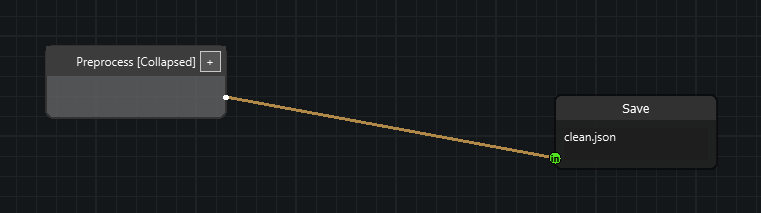
Collapse mechanics, per edge (never per node):
- Internal edges (both ends inside) →
grEdge.hide(). - Incoming edges (end inside) → stub row on the left box edge.
- Outgoing edges (start inside) → stub row on the right box edge.
- Rows are ordered deterministically by
edge.id, so stubs are stable across undo/redo and save/load. Box height grows to fit the row count. Edge.updatePositions()is collapse-aware: endpoints inside a collapsed group resolve toGroup.stubPosFor(edge); logic sockets are untouched.
Toggle via the painted +/− button (top-right of the title bar), the header
context menu, or the C shortcut for header-selected groups.
8. Appearance: rename and colors¶
group.setTitle("Prefilter")                        # False if empty/unchanged
group.setColors(color=QColor(70, 110, 180, 200))   # fill; title/border optional
group.setColors(title_color=..., border_color=...) # any None arg is kept
Interactive variants (used by the header menu; each caller stamps history):
group.renameInteractive()    # QInputDialog; True if renamed
group.recolorInteractive()   # QColorDialog for the fill color
Presets live in Group.GROUP_COLOR_PRESETS
(Gray/Blue/Green/Purple/Orange/Red). Double-clicking the header renames.
The header context menu offers Collapse/Expand, Rename…, Set color ▸,
Ungroup (keep nodes), Delete Group + Children.
9. Selection model (important for app code)¶
- Header click = exclusive selection of the group. This is what prevents the classic bug where a later node drag also drags the group (mixed selections move together in Qt).
Shift+header-click = additive selection (advanced use; dragging such a mixed selection moves everything once — selected children are skipped by the group follower).- Clicking a node normally deselects the group (standard Qt exclusive click).
scene.getSelectedItems()may containGroupitems — filter withhasattr(item, "node")when you only want nodes (as the calculator'sgetSelectedNodesdoes). History snapshots include group selection.
10. Deleting: three distinct operations¶
| Action | Effect | Trigger |
|---|---|---|
| Ungroup | Deletes only the box; all nodes (and edges) survive. Expands first if collapsed. | Header menu, U / Shift+G on selected groups |
| Delete Group + Children | Deletes the box and every child node (their edges go with the nodes). | Header menu, Del on a selected group (deleteSelected → deleteWithChildren) |
| Detach node | Removes one node from its group; node stays, group stays. | Your node context menu (see §13) |
group.ungroup()              # keep nodes
group.deleteWithChildren()   # Del-key semantics
group.dispose()              # low-level: drop graphics + scene entry (used internally)
11. Serialization (v2 format)¶
Scene.serialize() includes groups; each group stores:
{
  "id": 123, "type": "Group", "version": 2, "title": "My Group",
  "x": -20.0, "y": -50.0, "w": 470.0, "h": 310.0,
  "collapsed": true, "children": [11, 22],
  "style": {"color": [100,100,100,200], "title_color": [255,255,255,255],
            "border_color": [50,50,50,255]}
}
Notes:
- Positions/sizes of nodes are never altered by collapse, so expand restores exactly.
- Old files (
type: "GroupNode",child_node_ids,original_node_states) load best-effort as expanded — re-collapse them once and re-save to migrate. Scene.clear()removes nodes, edges, and groups.Node.remove()detaches from its group first.
12. History (undo/redo) and clipboard¶
- Group create/move/collapse/rename/recolor/ungroup/delete all stamp history, so
undo/redo restores membership, bounds, collapsed state, and internal-edge
visibility (expanded restores mirror
expand(); collapsed restores re-hide internals and refresh stubs). - Copy rule (wholesale): selecting just a group header copies the whole
group — children and internal edges are pulled in automatically. External edges
are kept only if both ends are in the copy. Rubber-banding all children of a
group (without the header) also preserves the group on paste. Cut uses the same
rule, then deletes via
deleteSelected.
13. Wiring your own app¶
13.1 Main-window menus + shortcuts (built in)¶
NodeEditorWindow provides Edit-menu actions and handlers — reuse or override:
| Shortcut | Action | Handler |
|---|---|---|
G |
Group selected (2+ nodes) | onGroupSelected |
U / Shift+G |
Ungroup selected groups | onUngroupSelected |
C |
Collapse/expand selected groups | onToggleCollapseSelected |
Single-letter shortcuts ignore keystrokes typed into node text fields
(focus guard in _groupingFocusInTextEdit). MDI apps (like the calculator)
inherit these via super().createActions()/createMenus().
13.2 Node context menu: Detach + gated Group item¶
Group Selected Nodes must only appear when it can act (>1 node), and grouped
nodes should offer detach. Pattern (as in calc_sub_window.py):
def handleNodeContextMenu(self, event):
    selected = ...  # resolve right-clicked node FIRST
    candidates = list(self.scene.getSelectedNodes())
    if selected is not None and selected not in candidates:
        candidates.append(selected)

    menu = QMenu(self)
    ...
    group_act = menu.addAction("Group Selected Nodes") if len(candidates) > 1 else None
    detach_act = (menu.addAction("Detach from Group")
                  if selected is not None and selected.parent_group is not None else None)
    ...
    if group_act is not None and action == group_act and len(candidates) > 1:
        self.onGroupSelectedNodes(candidates)
    if detach_act is not None and action == detach_act:
        selected.parent_group.removeNode(selected)
        self.scene.history.storeHistory("Detached node from group", setModified=True)
14. Rules & edge cases reference¶
- Dropping a node into a group while an edge-split (
EdgeIntersect) is armed: edge-split runs first, group-drop second — both can apply to one release. - Cutting (
Ctrl+drag) skips hidden internal edges of collapsed groups. - Connecting new edges to a collapsed group isn't possible by mouse (sockets are hidden) — expand first; existing externals keep working through stubs.
Scene.findGroupForDrop(pos, exclude_nodes)picks the smallest overlapping box;Scene.dropNodesIntoGroup(nodes, pos)returns whether anything changed.Scene.getGroupById(id)/findCollapsedGroupForNode(node)helpers exist for custom tools (e.g. routingEdge.updatePositions-style overrides).
15. Troubleshooting¶
| Symptom | Cause / fix |
|---|---|
| Clicks inside the box do nothing to the group | By design (click-through body). Use the title bar. |
| Group moves when dragging a node | Mixed {node, group} selection — header clicks are exclusive by default; check for code calling setSelected(True) additively or Shift held. |
| Box jumps when a node moves | onChildMoved tight-refits by design; children never move, only the rect. |
| Group missing after load | Old-format file: loads expanded; check groups array and children ids match nodes ids. |
| Pasted group lost its box | Only the header (or all children) was selected — see §12 copy rule. |
G types into a field instead of grouping |
Focus is in a text edit — by design; click the canvas first. |
16. API reference (quick index)¶
Group: addNode / removeNode / getChildNodes / contains,
calculateBounds / updateBounds, collapse / expand / toggleCollapse /
setCollapsed / isCollapsed / restoreExpandedVisuals / applyCollapsedAfterLoad,
setTitle / renameInteractive / setColors / recolorInteractive /
GROUP_COLOR_PRESETS / setDropHighlight
, ungroup / deleteWithChildren / dispose,
externalEdges / stubPosFor / refreshExternalEdges, serialize / deserialize,
shape (header-only hit-test) / paint.
Scene: addGroup / removeGroup / getGroupById / findCollapsedGroupForNode /
findGroupForDrop / dropNodesIntoGroup, groups list, parent_group on Node.