Graph algorithms (nodeeditor.node_graph)
A Scene holds a graph. An Edge runs from the Node owning its start
(output) Socket to the Node owning its end (input) Socket, so the
graph is directed and data flows from producer to consumer.
nodeeditor/node_graph.py implements the algorithms over that graph
natively. No third-party graph library is required, and nothing has to be
installed or configured.
from nodeeditor.node_scene import Scene

scene = Scene()
...
scene.topological_order()          # [Node, ...] in dependency order
scene.descendants(node)            # [Node, ...] reachable downstream
scene.ancestors(node)              # [Node, ...] feeding this node
scene.components()                 # [[Node, ...], ...] the disconnected flocks
scene.cycles()                     # [[Edge, ...], ...] the loops in the graph
scene.paths(a, b)                  # [[(Node, Edge), ...], ...] every route
scene.shortest_path(a, b)          # [(Node, Edge), ...] or None
The same functions are available as module-level functions taking the scene
as their first argument, for example
nodeeditor.node_graph.descendants(scene, node).
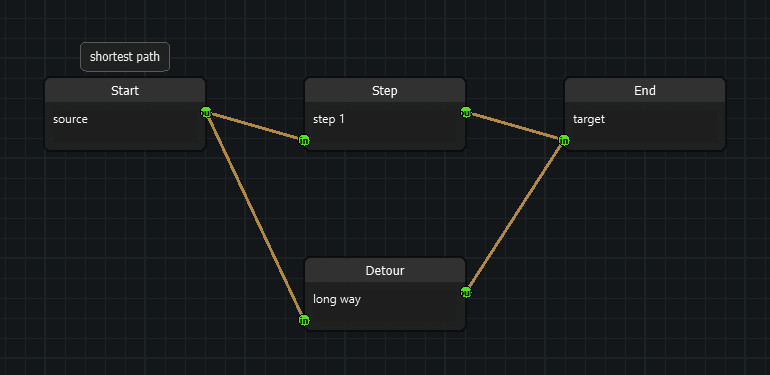
What counts as an edge
Only an Edge whose start socket is an output and whose end socket is an
input takes part. An Edge that is detached, or that was wired
output-to-output, is ignored. Two Edges between the same pair of Nodes
are two separate edges and both count.
Groups (nodeeditor/node_group.py) are visual containers. Their edges are
not cut, so a Group never changes the shape of the graph. Edges internal to
a collapsed Group are hidden on screen but still carry data, so they still
count here.
Ordering
topological_order() puts every Node after the Nodes feeding it, so a
Node can be evaluated once every input it needs has been evaluated. Nodes
that do not depend on each other keep their scene order, which makes the
result reproducible: the same graph always yields the same sequence.
When the graph contains a cycle there is no such order, and
topological_order() raises GraphCycleError:
from nodeeditor.node_graph import GraphCycleError

try:
    order = scene.topological_order()
except GraphCycleError as error:
    for cycle in error.cycles:
        print([edge.start_socket.node.title for edge in cycle])
scene.cycles() returns the same cycles without raising, one representative
cycle per cyclic region.
Components
components() returns the disconnected subgraphs of the scene: two Nodes
belong to the same component when a chain of Edges connects them, whatever
the direction. A Node without any connection forms a component of its own.
This is how you find the independent "flocks" of nodes in one scene:
The components come in scene order, and the Nodes inside a component come
in scene order too.
Paths
A path is a list of (node, edge) steps. The edge of a step is the Edge
that led into its Node; the first step carries None, because nothing leads
into the first node.
paths() returns every simple path, so two Edges between the same pair of
Nodes produce two different paths. shortest_path() returns the one with
the fewest edges, or None when the target cannot be reached.
Cycle safety
Every traversal is iterative and keeps a visited set. Two consequences:
- A graph containing a cycle terminates. Nothing in this module can exhaust the interpreter's recursion limit.
- A
Nodereachable through several distinct paths is visited once, not once per path. A graph of 42 nodes arranged as 20 layers of diamonds takes microseconds instead of the several seconds a per-path walk would need.
Node.markDescendantsDirty() and Node.markDescendantsInvalid() are built
on this and inherit both properties.
Seeing the result in the calculator example
examples/example_calculator has a Graph Inspector dock at the bottom of
the window. Its four buttons, and the matching entries in the Graph menu,
run the algorithms on the graph of the active tab:
| Button | Calls | Shortcut |
|---|---|---|
| Topological Order | scene.topological_order() |
Ctrl+Shift+T |
| Flocks | scene.components() |
|
| Cycles | scene.cycles() |
|
| Selected Path | scene.shortest_path() between the two selected nodes |
Ctrl+Shift+P |
Every result is listed with a step number per row. Click a row to select that node on the canvas and centre the view on it, so the listed order can be followed in the graph itself.
Asking for the topological order of a graph with a cycle lists the cycles instead of failing.