Formula
Adds calculated columns, or replaces the values of an existing column, using SQL expressions. One node holds up to five formulas; each can use the columns created by the ones above it.
Quick links
- Formula reference: every function family with examples (arithmetic, string, date, regex, and more).
- SQL expressions guide: column reference syntax, the CSV text pitfall, and the read-only guard.
Purpose
Adds calculated columns, or replaces the values of an existing column, using SQL expressions. One node holds up to five formulas; each can use the columns created by the ones above it.
When to use it
Convert text to numbers or dates, compute a total or variance, build a category, combine columns, flag exceptions.
Inputs and outputs
| Socket | Carries |
|---|---|
| Input | The table to add columns to |
| Out | The same rows with the new or changed columns |
Settings
The Config Dock shows one card per formula. The dock toolbar has an Add formula (plus) icon button and each card has a Remove formula icon button. A new node starts with one empty card.
| Control | Default | Effect |
|---|---|---|
| Target column (drop-down) | "Select target column" | Where the result goes. Choose an existing column to replace it, or + add column to create a new one (an "Add Column" box asks for the name). Columns made by earlier cards are listed too. |
| Data type (drop-down) | Auto | Applied to the result with CAST, for a new column or for one that is replaced. Choices: Auto, String, Integer, Float, Boolean, Date, Datetime, Time, Categorical. Auto keeps whatever the SQL produces. If the target is a column of the input the box is greyed and shows that column's type. Categorical results are Categorical columns. Time results are kept as text (HH:MM:SS) because the app has no Time column type. |
Formula (SQL editor; placeholder Enter formula e.g.: / CASE WHEN [Age] > 30 THEN 'Adult' ELSE 'Young' END) |
empty | A SQL expression; see Writing SQL expressions. Drag the grip under the editor to make it taller. A message under the editor explains any error. |
| Card header arrow | expanded | Collapse a card. |
A card counts only when it has both a target column and a formula. Cards without both are skipped; if none counts, the table passes through unchanged. Formulas run top to bottom, so a later card may use a column created by an earlier one.
When a formula replaces a column made by an earlier card, the Data type of the card is applied to the result. When it replaces a column of the input the box is greyed; use CAST in the formula to change that column's type. A node holds at most five cards; a saved workflow with more stops with TD-SHAPE-004 ("holds at most 5 formulas") instead of dropping the extra cards.
The dock chips show how many columns the input has and how many formulas are set, for example "2 of 3 formulas".
Worked example
Input (all text):
| id | vendor | order_value | date |
|---|---|---|---|
| 1 | Acme | 120.50 | 2024-01-31 |
| 2 | Beta | 900 | 2024-02-15 |
| 3 | Acme | abc | 2024-03-01 |
| 4 | Cole | 450 | 2024-03-31 |
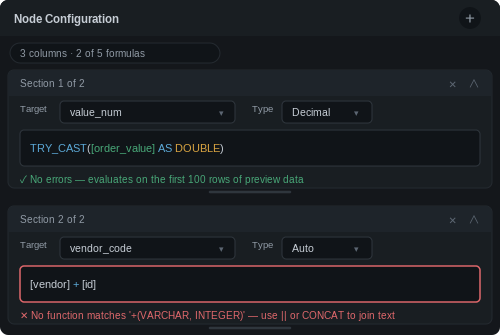
One formula: new column value_num, formula TRY_CAST([order_value] AS DOUBLE).
| id | vendor | order_value | date | value_num |
|---|---|---|---|---|
| 1 | Acme | 120.50 | 2024-01-31 | 120.5 |
| 2 | Beta | 900 | 2024-02-15 | 900.0 |
| 3 | Acme | abc | 2024-03-01 | (empty) |
| 4 | Cole | 450 | 2024-03-31 | 450.0 |
Two formulas in one node:
-- formula 1: new column "size"
CASE WHEN TRY_CAST([order_value] AS DOUBLE) >= 400 THEN 'Large'
     WHEN TRY_CAST([order_value] AS DOUBLE) IS NULL THEN 'Unreadable'
     ELSE 'Small' END
-- formula 2: existing column "vendor"
UPPER([vendor]) || '-' || CAST([id] AS VARCHAR)
| id | vendor | order_value | date | size |
|---|---|---|---|---|
| 1 | ACME-1 | 120.50 | 2024-01-31 | Small |
| 2 | BETA-2 | 900 | 2024-02-15 | Large |
| 3 | ACME-3 | abc | 2024-03-01 | Unreadable |
| 4 | COLE-4 | 450 | 2024-03-31 | Large |
Edge cases and limits
- Preview uses 100 rows.
- While you type, Formula checks names and syntax against the columns. An error that depends on the values (for example text that cannot be converted for a real row) appears when you leave the node, from the first 100 rows.
- At most five formulas per node (the add button stops at five); a file with more stops with
TD-SHAPE-004. Chain two Formula nodes for more, or use Multi-Field Formula to apply one rule to many columns. - Results are stored as the app's standard types (whole numbers, decimals, text, dates, yes/no); unusual SQL result types are converted.
- Empty cells: most functions return empty when an input is empty. Use
COALESCE([x], 0)to substitute a value. - Failed conversions:
TRY_CASTgives an empty cell;CASTstops the node with an error. - Each formula is one expression and is protected by the read-only guard.
Messages you may see
The text after the code starts with the formula number, for example Section 2: ....
| Code | When | Fix |
|---|---|---|
TD-SHAPE-004 |
The SQL engine rejected the formula: a type mismatch (No function matches ... VARCHAR), an unknown column (Referenced column "x" not found), a syntax error |
Use TRY_CAST; check column names and brackets |
TD-SHAPE-110, -112, -114, -115 |
Breaks the read-only guard | Remove the offending part |
TD-SHAPE-005 |
No input data | Fix the upstream node |
Tips
- Work in steps: one card cleans the text, the next converts it, the next calculates. The preview shows the result of each.
- Name new columns clearly (
amount_num,is_late) so later nodes and reports are readable. - Yes/no formulas such as
[amount_num] > 1000make good flag columns for a Filter.
Back to the Preparation node index.