Alpha · v0.1.0-alpha.1/Windows, macOS, Linux

Data preparation
you can defend.

Trigger Designer is a desktop workbench for auditors and analysts. Wire nodes into a pipeline, inspect every intermediate frame, and hand over a workflow that explains its own numbers.

MIT licensed·39 nodes·Polars engine·No account

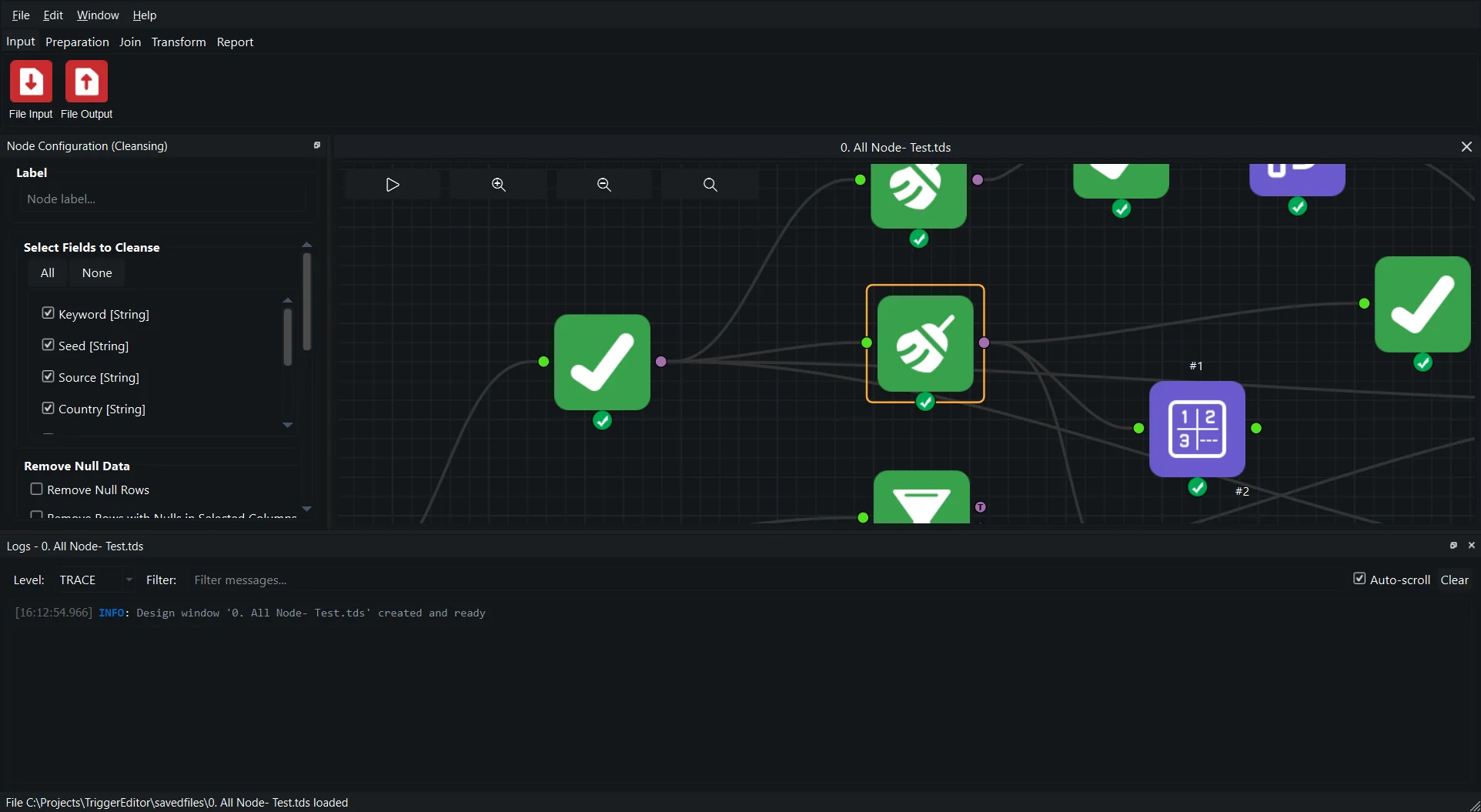
Exhibit A Canvas, Config Dock, preview and log
Trigger Designer main window: a loaded workflow on the node canvas, the Config Dock editing a Cleansing node, the data preview below, and the logging dock on the right.
A loaded workflow. The Config Dock edits a Cleansing node while the preview shows the frame after each step, so a wrong type or a dropped row is visible before the file leaves the app.

Purpose

Every step is a claim you can check.

An audit file is only as good as the trail behind it. Trigger Designer keeps the trail: the graph is the documentation, the preview is the evidence, and the run history records what changed between the two.

Prepare

Sixteen preparation nodes fix types, trim text, filter rows and calculate columns. The Formula node runs DuckDB expressions against the live frame with syntax highlighting and error detection.

Cleansing · Filter · Formula · Aggregate · Select · Sort

Test

Five audit nodes look for duplicates, sequence gaps, Benford outliers and risky rows. Findings arrive as frames you can filter, not as a verdict you have to trust.

Duplicates · Gaps · Benford · Sample · Risk Filters

Deliver

Write CSV, Parquet or Excel. Workpaper Output adds the pipeline, the parameters and the result as separate sheets, so the workbook carries its own working papers.

File Output · Workpaper Output

Node index

Thirty-nine nodes, six families.

The palette covers the work between a raw file and a reviewable answer. Each node page lists its settings, its output shape and the edge cases worth knowing.

Node families in Trigger Designer
Family Nodes Covers Reference
Input & Output 3 Files in; files and workpapers out
Preparation 16 Clean, filter, calculate, reshape
Join 5 Join, append, union, reconcile, fuzzy match
Transform 7 Count, running totals, pivot, window, SQL
Report 3 Graphs, data profiles, annotations
Audit 5 Duplicates, gaps, Benford, sampling, risk

Browse the full node reference

A run, end to end

Four moves from file to finding.

  1. 01

    Wire

    Drop a node, connect the sockets, name the branch. The graph saves as a portable .tds file you can keep beside the workpaper.

  2. 02

    Configure

    The Config Dock follows the selected node. Controls are live, and every edit lands on the undo timeline as a named step.

  3. 03

    Inspect

    Read the frame in the preview, the messages in the log, and anything unresolved in the problems panel.

  4. 04

    Export

    Write the result, then run the same workflow from the command line when the file has to be rebuilt next month.