Errors and problems
When something is wrong, the app tells you which node, what is wrong, and what to try. Every message carries a stable code such as TD-SCH-001 so that you, a colleague and a support person all mean the same thing. This page explains where messages appear, how to read them, and lists every code.
On this page
- Where you see an error
- How to read a message
- Row numbers, values and "did you mean"
- Errors caused by an earlier node
- Technical details and copying details
- Privacy: hiding data values in messages
- A fixing routine that works
- Error code reference
Where you see an error
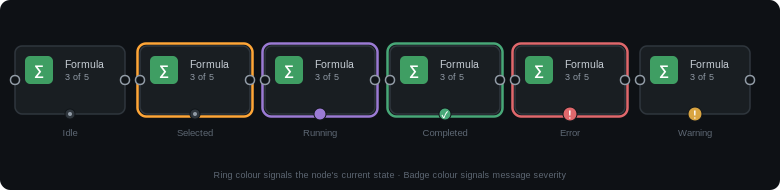
| Where | What you see |
|---|---|
| The node | A red ring and a red round "!" badge on its bottom edge (amber for a warning). Hover the node to read a short message. |
| The Logs dock | One row per node with a problem, mixed into the log stream: node, one-sentence description, and an expandable code plus Fix: line. Click a row to jump to the node. See Logs. |
| The log file | The error is written once, when it first appears, with its full technical text. |
| The run record | A failed node's error is stored in the run record (see Run history). |
| A dialog | Only for things outside a node: a file that cannot be opened, an Excel export that failed, a workflow with unknown nodes. |
Errors come in two kinds. A live error appears while you edit (it is about the sample of 100 rows). A run error appears when you press Run (it is about all the data). A node can have both. A live error disappears as soon as you fix the setting and the node recomputes. A run error disappears when you start the next Run, or when you change the node or its connections.
How to read a message
Example: a real error from the Logs dock (copied with Copy details)
[TD-TYP-001] Select 'Amounts': Column 'Amount' has values that cannot be read as whole numbers.
Fix: Clean or correct the value in the source data.
Other fixes: Add a Select node before this one and set 'Amount' to a whole number; values that cannot be converted become empty instead of stopping the run.
Columns: Amount
Rows/values: 'abc'
Phase: run   Severity: error   Time: 2026-10-30T16:59:07+00:00
| Line | Meaning |
|---|---|
[TD-TYP-001] |
The code. The letters say the family (TYP = data types, SCH = columns, IN = input files, OUT = output files, SHAPE = node settings, RUN = running, AUDIT = audit nodes). Look it up in the reference below. |
Select 'Amounts': ... |
The node (its title, then its label in quotes if it has one) and what is wrong, in one sentence. |
Fix: |
The first thing to try. |
Other fixes: |
Alternatives. |
Columns: |
The columns involved. |
Rows/values: |
An example of the offending data, when the app can find it. |
Phase: |
run (you pressed Run) or live (editing). |
Severity: |
error stops the node; warning does not. |
Warnings (amber badge) are not errors
A warning means the node produced a result but something deserves attention, for example "Only 12 rows were tested; at least 50 are needed for a reliable result" from an Audit node. The node still passes data downstream.
Row numbers, values and "did you mean"
The app does a little detective work for you.
Row and value location. When a column cannot be converted (to a number, a date and so on, codes TD-TYP-001, TD-TYP-003 and TD-TYP-005), the app runs a second, bounded search to find the first offending row and a few bad values, and rewrites the message:
Column 'Amount' contains 'abc' in row 3, which cannot be read as whole numbers.
Things to know about row numbers:
- Row 1 is the first data row of the table going into the failing node, after any earlier nodes have filtered or sorted it. It is not the line number in the CSV file or the row number you see in Excel (which would also count the header).
- The search looks at no more than a set number of rows (default 5,000,000). In a bigger table, the first bad value might be beyond the limit and the message stays general.
- Both the search and its limit are in Edit > Settings > General > Error messages (see Preferences).
Did you mean. If a column, a sheet or a function name is not found, the app compares the name with the real ones and suggests the closest, ignoring case, spaces, hyphens and underscores:
[TD-SCH-001] Duplicates: Column 'Order_Id' was not found. Fix: Use the column 'Order_ID' instead.
Errors caused by an earlier node
Often the node that fails is only where the problem shows. A Select node may complain about a column, when the real cause is a File Input that read the column as text. The app tries to find the real cause:
- The real culprit is shown with its own error, and the nodes after it show "Stopped because 'X' has a problem" or "Skipped because 'X' failed" (codes
TD-RUN-003,TD-RUN-008). These are knock-on errors: fix the first node and they clear by themselves. - In the Logs dock a line Caused by: names the culprit node.
When you see several errors, start with the one that is furthest upstream (closest to the File Input).
Technical details and copying details
Messages are written for people, but the engine's own words are kept for support.
- In the Logs dock, click the Show technical details icon button in the toolbar (hover to see its tooltip). An expanded problem row then also shows the engine's exception text and, for run errors, the stack trace. The toggle is remembered between sessions (preference
errors/show_technical, off by default). - Click Copy details to put the selected problems (or all of them, when none is selected) on the clipboard. If technical details are on, they are included. Paste this into an email or ticket.
Privacy: hiding data values in messages
By default a message can include a few of the offending values ("contains 'abc'"). That is useful, but values from a ledger can be sensitive. Tick Edit > Settings > General > Error messages > "Hide data values in error messages" (preference errors/redact_values, off by default) and:
- messages keep the code, the column and the row number but leave the values out (the row line says "values hidden by privacy setting"),
- the engine text and stack trace have the offending values scrubbed,
- the error stored in the run record is redacted the same way.
The setting is read when an error is created, so it affects errors raised after you switch it on; recompute the node or Run again to refresh one that is already on screen. It removes values from messages; it does not change what is in your data or your output files. See Security and privacy.
A fixing routine that works
Follow these steps in order
- Open Logs and pick the Errors chip. Start with the topmost, most upstream node.
- Read the Fix: line and apply it.
- Click away from the node (to let it recompute) and check that the red mark is gone.
- If the same column keeps failing, look at the data type: text columns that hold numbers are the usual cause. See Troubleshooting.
- Still stuck? Show technical details, Copy details, and send the text with the workflow file to support.
Error code reference
Codes are stable: a code is never reused for something else. Placeholders in braces, such as {column}, are filled in with the real name when the message is shown. A few codes are marked flagged reserved in the catalogue; they are defined but the catalogue marks them as not yet raised in that form.
The table is generated from the code. To regenerate it after the catalogue changes, run from the repository root:
Add --check to see whether the page is out of date without changing it.
136 codes. Generated from core/errors/catalogue.py and core/shaping/common.py; do not edit by hand.
Reading input files (TD-IN)
File Input, folders, databases.
| Code | What it says | How to fix it |
|---|---|---|
TD-IN-001 |
The file '{path_name}' was not found. | 1. Check that the file exists and that the drive or network share is reachable. 2. Choose the file again with Browse in the File Input node. |
TD-IN-002 |
'{path_name}' cannot be read: it is open in another program or access is denied. | 1. Close the file in Excel or any other program, then run again. 2. Ask for read permission on the folder. |
TD-IN-003 |
Sheet '{sheet}' does not exist in '{path_name}'. | 1. Pick one of the available sheets in the node settings. 2. Use the sheet '{suggestion}' instead. |
TD-IN-004 |
'{path_name}' is not UTF-8 text. | Open the file in Excel or Notepad and save it again as 'CSV UTF-8'. |
TD-IN-005 |
'{path_name}' is empty. | Check that the export that produced the file finished, then reload it. |
TD-IN-006 |
'{path_name}' is not a readable Excel workbook. | 1. Open it in Excel and save it again as .xlsx. 2. If it is really a text file, rename it to .csv and choose File type CSV. |
TD-IN-007 |
Some rows have more fields than the header. | 1. Check the delimiter in the node settings. 2. Make sure values containing the delimiter are wrapped in quotes. |
TD-IN-010 |
I could not read the data in this file | Check the file type and delimiter; the details name the column. |
TD-IN-011 |
The input file could not be opened | Check the path and your access rights. |
TD-IN-012 |
The folder matches too many files | Narrow the include pattern or raise "Max files". |
TD-IN-013 |
The database could not be read as requested | Check the table name and use a single SELECT statement; databases are read-only. |
TD-IN-014 |
The File Input settings need attention | Open File Input and fix the highlighted setting. |
Columns and schemas (TD-SCH)
A column is missing, renamed or differs between files.
| Code | What it says | How to fix it |
|---|---|---|
TD-SCH-001 |
Column '{column}' was not found. | 1. Use the column '{suggestion}' instead. 2. Select the column again in this node; it may have been renamed, dropped or typed differently upstream. |
TD-SCH-002 |
The column name '{column}' appears more than once. | Rename one of the columns with a Select node before this step. |
TD-SCH-003 |
The columns in '{path_name}' changed since the workflow was saved. (warning, flagged reserved in the catalogue) | Review the nodes that use the changed columns. |
TD-SCH-004 |
The two tables have different columns or types. | Make both inputs have the same columns and types (use Select nodes), or use a mode that fills missing columns. |
TD-SCH-005 |
Columns have different numbers of rows. | Check the upstream step that builds these columns from separate lists. |
TD-SCH-010 |
An added column name already exists in the data | Rename the filename/sheet column in File Input. |
TD-SCH-011 |
Files in the folder have different columns | Use "Union by name" or fix the odd file named in the details. |
Data types and conversion (TD-TYP)
A value could not be read as a number, date or other type.
| Code | What it says | How to fix it |
|---|---|---|
TD-TYP-001 |
Column '{column}' has values that cannot be read as {target_human}. | 1. Clean or correct the value{row_hint} in the source data. 2. Add a Select node before this one and set '{column}' to {target_one}; values that cannot be converted become empty instead of stopping the run. 3. In the formula, use TRY_CAST([{column}] AS {target_sql}) so bad values become empty. |
TD-TYP-002 |
Join keys have different types: '{left_key}' is {left_type} but '{right_key}' is {right_type}. | 1. Add a Select node on one side and set the key column to the same type (usually Text). 2. Check that both columns really contain the same kind of value. |
TD-TYP-003 |
Column '{column}' is text, so it cannot be {op_past}. | 1. Clean or correct the value{row_hint}. 2. Add a Select node before this one and set '{column}' to Decimal. |
TD-TYP-004 |
Text and numbers cannot be compared. | Set the column to a number type with a Select node, or put the value in quotes if the column is text. |
TD-TYP-005 |
A value in '{column}' does not fit in the target type ({target}). | Use a wider type (for example Int64 or Decimal) in a Select node. |
TD-TYP-006 |
This step needs a {expected} column but '{column}' is {got}. | Check which column this node uses and its type in the Select node. |
TD-TYP-007 |
The filter condition must give true or false, not {got}. | Write a comparison such as [Amount] > 0. |
Joins (TD-JOI)
Join and union problems.
| Code | What it says | How to fix it |
|---|---|---|
TD-JOI-001 |
No columns are mapped. (flagged reserved in the catalogue) | Map at least one column in the node settings. |
TD-JOI-002 |
Both inputs must be connected. (flagged reserved in the catalogue) | Connect a node to each input. |
Node settings and data shaping (TD-SHAPE)
Select, Formula, Filter, SQL Query, Pivot, Reconcile, Fuzzy Match and the other shaping nodes.
| Code | What it says | How to fix it |
|---|---|---|
TD-SHAPE-001 |
A required setting is missing | Fill in the missing setting. |
TD-SHAPE-002 |
An output column name is empty, duplicated or already exists | Choose a unique name. |
TD-SHAPE-003 |
A selected column is not in the input any more | Select the column again. |
TD-SHAPE-004 |
A setting value is out of range or unknown | Pick a value from the list or inside the range. |
TD-SHAPE-005 |
A required input has no data | Connect and fix the upstream node. |
TD-SHAPE-040 |
The pattern is not a valid regular expression | Escape special characters with a backslash. |
TD-SHAPE-041 |
The pattern is too long | Shorten the pattern. |
TD-SHAPE-042 |
Find text is empty | Type the text to find. |
TD-SHAPE-043 |
Too many rules | Remove rules or split them over two nodes. |
TD-SHAPE-044 |
The column must be text | Convert the column to text with a Select node. |
TD-SHAPE-050 |
The column is not a date and not text | Choose a date or text column. |
TD-SHAPE-052 |
A holiday is not a YYYY-MM-DD date | Type holidays as year-month-day. |
TD-SHAPE-053 |
Working days must name at least one weekday | Tick at least one weekday. |
TD-SHAPE-060 |
Index, header and value columns must be different | Pick three different columns. |
TD-SHAPE-061 |
Too many new columns | Filter the header column to fewer distinct values. |
TD-SHAPE-070 |
Amount or date column is set on one side only | Pick it on both sides, or on neither. |
TD-SHAPE-071 |
Add a key column pair or a date column | Add a key pair or a date window. |
TD-SHAPE-072 |
Too many possible matches | Add key column pairs or narrow the date window. |
TD-SHAPE-081 |
Too many possible fuzzy pairs | Use a longer prefix or add a 'Must also match' column. |
TD-SHAPE-082 |
Too many rows to compare without blocking | Turn on prefix or first-word blocking. |
TD-SHAPE-091 |
The column must be a number | Pick a numeric column, or a text column that holds numbers. |
TD-SHAPE-101 |
The split pattern can match nothing | Use a pattern that needs at least one character, such as \s+ not \s*. |
TD-SHAPE-110 |
Only one statement is allowed | Remove everything after the first statement. |
TD-SHAPE-111 |
Only SELECT queries are allowed | Write a SELECT query; changing data or settings is not allowed. |
TD-SHAPE-112 |
The SQL uses a function or file access that is not allowed | Remove file-reading, system or random functions. |
TD-SHAPE-113 |
The SQL could not be parsed or run | Check the SQL syntax. |
TD-SHAPE-114 |
The SQL is too long | Shorten the SQL. |
TD-SHAPE-115 |
The query took too long | Simplify the query or filter the data first. |
TD-SHAPE-120 |
The formula must use the column placeholder | Write {col} where the column goes, for example UPPER({col}). |
TD-SHAPE-130 |
The generated rows do not match the input rows | Set Start, Increment and End so the number of generated values equals the number of input rows, or remove the input. |
Writing output files (TD-OUT)
File Output and workpaper export.
| Code | What it says | How to fix it |
|---|---|---|
TD-OUT-001 |
The output folder does not exist. | Create the folder, or choose an existing one in the File Output node. |
TD-OUT-002 |
'{path_name}' cannot be written: it is open in another program or read-only. | 1. Close the file in Excel or any other program, then run again. 2. Choose a different file name or clear the read-only flag. |
TD-OUT-003 |
Excel export is not available in this installation. | 1. Export as CSV or Parquet instead. 2. Reinstall the application. |
TD-OUT-004 |
'{path_name}' is not a valid output file name. | 1. Remove characters such as < > : " | ? * and keep the path short. 2. Choose a file, not a folder. |
TD-OUT-005 |
The disk is full. | Free some space or write to another drive. |
TD-OUT-006 |
Nothing is connected to this output. | Connect the node whose result you want to save to the File Output node. |
TD-OUT-010 |
A workpaper with this name already exists | Choose another file name, or set "If the file exists" to New version. |
TD-OUT-011 |
The table has too many columns for Excel | Excel allows at most 16,384 columns; select fewer columns before writing. |
TD-OUT-012 |
The workpaper settings are not valid | Check the output file (it must end in .xlsx) and the Prepared on date (YYYY-MM-DD). |
TD-OUT-013 |
The table is too large for an Excel sheet | An Excel sheet holds at most 1,048,575 data rows; save it as CSV or Parquet instead. |
TD-OUT-014 |
Excel could not create the workbook | A sheet name or cell content is not valid for Excel; rename the sheet or shorten the text. |
TD-OUT-015 |
Excel output must use the .xlsx extension | Change the output file name to end in .xlsx (the writer cannot create the old .xls format). |
Running a workflow (TD-RUN)
Problems found while a run executes.
| Code | What it says | How to fix it |
|---|---|---|
TD-RUN-001 |
This step took longer than {seconds} seconds and was stopped. | 1. Filter or sample the data earlier in the workflow. 2. Write large results to Parquet instead of CSV or Excel. |
TD-RUN-002 |
This step ran out of memory. | 1. Filter rows or drop unused columns earlier in the workflow. 2. Close other programs and run again. |
TD-RUN-003 |
Stopped because '{culprit_label}' has a problem. | Fix '{culprit_label}' first, then run again. |
TD-RUN-004 |
The run was cancelled before this step. (warning, flagged reserved in the catalogue) | Run the workflow again. |
TD-RUN-005 |
Input {input_number} is not connected. (warning) | Connect a node to this input. |
TD-RUN-006 |
This step needs the result of an earlier step that is not available. | 1. Fix the earlier step ('{culprit_label}') and run again. 2. Open the earlier step so it is calculated, then run again. |
TD-RUN-008 |
Skipped because '{culprit_label}' failed. (warning) | Fix '{culprit_label}' and run again. |
Expressions and formulas (TD-EXP)
Problems in formula or expression text.
| Code | What it says | How to fix it |
|---|---|---|
TD-EXP-001 |
The expression has a syntax error. | Check brackets, quotes and operators near the marked spot. |
TD-EXP-002 |
Unknown function '{function}'. | 1. Use '{suggestion}' instead. 2. Check the function name in the formula help list. |
TD-EXP-003 |
The expression cannot be evaluated. | Check the column names and types used in the expression. |
TD-EXP-004 |
The pattern (regular expression) is not valid. | Escape special characters such as ( ) [ ] with a backslash. |
TD-EXP-005 |
A function received a value it cannot use. | Check the arguments of the function, or use TRY_CAST for conversions. |
System and resources (TD-SYS)
Memory, time and environment.
| Code | What it says | How to fix it |
|---|---|---|
TD-SYS-001 |
{message} | Check this node's settings. |
TD-SYS-100 |
The data engine could not run this step. | Check the node settings and the upstream data; copy the details if you need help. |
TD-SYS-998 |
The data engine stopped unexpectedly. | Run again; if it repeats, copy the details and report it. |
TD-SYS-999 |
Something unexpected went wrong. | Copy the details and report it if it repeats. |
Audit nodes (TD-AUDIT)
Benford, Duplicates, Gaps, Sample and the risk filters.
| Code | What it says | How to fix it |
|---|---|---|
TD-AUDIT-001 |
Choose the {label} column. | Pick the column in the node settings. |
TD-AUDIT-002 |
Column '{col}' is not in the input data. | Pick the column again; it may have been renamed upstream. |
TD-AUDIT-003 |
Column '{col}' holds nested values and cannot be used for this test. | Choose a plain text, number or date column. |
TD-AUDIT-004 |
{label} must be {rule}. | Enter a value inside the allowed range. |
TD-AUDIT-005 |
The input already has a column named '{name}', which this node adds. | Rename the existing column first. |
TD-AUDIT-006 |
'{text}' is not a date. Use YYYY-MM-DD. | Type the date as year-month-day. |
TD-AUDIT-007 |
Date format '{fmt}' is not supported. | Choose one of the formats in the list. |
TD-AUDIT-008 |
Switch on at least one risk test. | Tick at least one test in the node settings. |
TD-AUDIT-009 |
{label}: {detail}. | Fix the list of numbers (count and order). |
TD-AUDIT-010 |
No row has a readable amount in '{col}', so a value-based sample cannot be drawn. | Choose a numeric amount column or clean the values. |
TD-AUDIT-101 |
Only {n} rows were tested; at least {min} are needed for a reliable result. (warning) | Treat the result as indicative only. |
TD-AUDIT-102 |
{n} values could not be read as {kind} and were skipped. (warning) | Clean those values or convert the column with a Select node. |
TD-AUDIT-103 |
Requested {k} but only {n} rows exist; the whole population was selected. (warning) | Lower the sample size. |
Command line (TD-CLI)
Raised by the command-line runner; see cli.md.
| Code | What it says | How to fix it |
|---|---|---|
TD-CLI-001 |
The workflow file could not be read. | Check the path and that it is a .tds file. |
TD-CLI-002 |
The workflow was saved by a newer Trigger Designer. | Update this program. |
TD-CLI-003 |
The workflow uses an unknown node type. | Open and re-save it in a compatible version. |
TD-CLI-004 |
The workflow has a cycle. | Remove the connection that loops back. |
TD-CLI-005 |
Unknown or missing parameter. | Use one of the listed parameter names. |
TD-CLI-006 |
A parameter value is not valid. | Use the example format shown. |
TD-CLI-007 |
This parameter target is not supported. | Choose a supported setting. |
TD-CLI-008 |
The workflow has not been approved to run unattended. | Approve it first (approve). |
TD-CLI-009 |
The approved workflow changed since approval. | Approve it again. |
TD-CLI-010 |
The generated code was refused by the safety policy. | Remove the flagged node or setting. |
TD-CLI-011 |
A custom-code node was refused. | Remove the custom-code node. |
TD-CLI-012 |
Another run of this workflow is in progress. | Wait and try again. |
TD-CLI-013 |
The outputs could not be saved. | Close the output files in other programs and run again. |
TD-CLI-014 |
The output folder is missing or not writable. | Create it or use --create-output-dirs. |
TD-CLI-015 |
There is not enough free disk space. | Free space or lower --min-free-mb. |
TD-CLI-016 |
The scheduler could not be configured. | Check Windows Task Scheduler permissions. |
TD-CLI-017 |
The run log failed verification. | Treat the log as modified. |
TD-CLI-018 |
This workflow writes no files. (warning) | Add a File Output node. |
TD-CLI-019 |
The data owner's access policy does not allow this. | Ask the data owner to raise the access level in the policy file. |
TD-CLI-020 |
The node was not found, or the name matches several nodes. | Use the node's numeric id (see info). |
TD-CLI-021 |
This node has no table to look at. | Look at the node that feeds it. |
TD-CLI-022 |
A setting name or value is not valid for this node type. | Run ops <node type> to see each setting's type and default. |
TD-CLI-023 |
That connection is not allowed. | Check the output and input numbers, that the input is free, and that it does not make a loop. |
TD-CLI-024 |
A file setting points outside the folders an edit may use. | Use a path inside the workflow's folder, or ask the data owner to list the folder under paths in the policy file. |
TD-CLI-025 |
The SQL was refused by the safety check. | Only one read-only SELECT is allowed: no files, no system or random functions, no changes. |
TD-CLI-026 |
The workflow changed since it was read. | Read it again (info shows its sha256) and redo the edit. |
TD-CLI-027 |
The edit is malformed or cannot be applied to this workflow. | Read the message: it names the edit and the field. |
TD-CLI-028 |
The AI server was asked for a workflow outside the folders it may use. | Use a workflow inside a --workspace folder, or start the server with that folder added. |
Optional modules (TD-MOD)
Adding, checking or removing an optional data pack, such as a local model.
| Code | What it says | How to fix it |
|---|---|---|
TD-MOD-001 |
A module description is not valid. | Update Trigger Designer, or ask the publisher for a corrected module list. |
TD-MOD-002 |
That module is not installed. | Check the module name, or list the installed modules. |
TD-MOD-003 |
The module was not approved for download. | Read the consent screen again and accept it to continue. Nothing was downloaded. |
TD-MOD-004 |
The download address is not allowed. | Modules are downloaded only from a secure (https) address of their publisher. Nothing was installed. |
TD-MOD-005 |
The module could not be downloaded. | Check the internet connection and try again. Nothing was installed. |
TD-MOD-006 |
A module file has the wrong size. | The download was stopped and discarded. Try again later, or report it to the publisher. |
TD-MOD-007 |
A module file failed its hash check. | The file was discarded and nothing was installed. Report it to the publisher. |
TD-MOD-008 |
The module could not be written to the data folder. | Check that the disk has free space and that the data folder is writable, then try again. |
TD-MOD-009 |
The module download was cancelled. (warning) | Nothing was installed. Start the download again when you are ready. |