A PowerToys Command Palette extension
A note, kept before you lose it.
Type a thought, press Enter, and it’s saved. Search your notes and clipboard history together, then paste anything back into the app you came from. Plain files on your PC. No network, no accounts.
This sheet is live. Press Enter and your note joins the ledger below.
In the app
Four screens from the palette. Pick one to look at it.
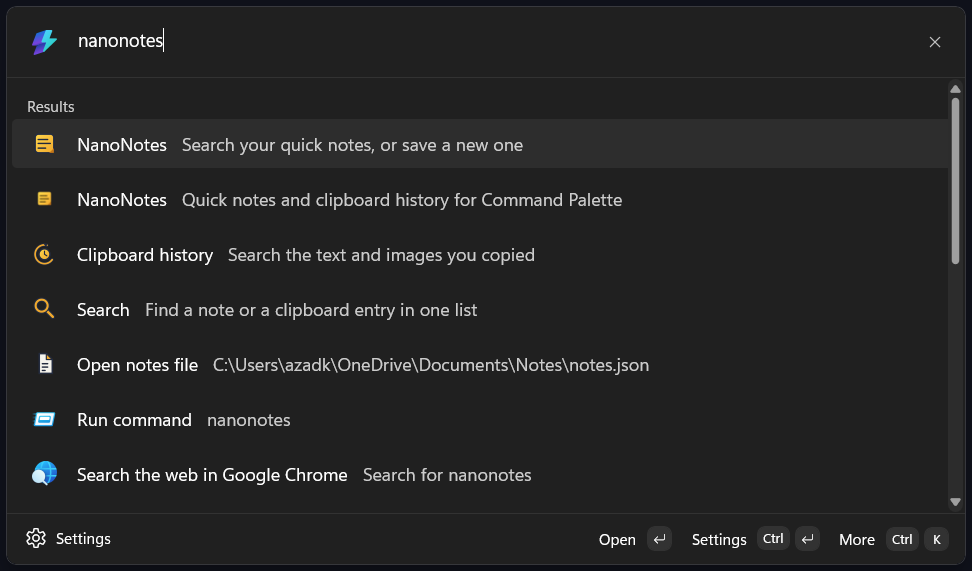
Notes and clipboard, one search
One box looks through both. Matches come back newest first, each row labelled with where it came from. Try it. This list is searchable.
Notes
- call the landlord about the leak
- idea: clipboard as a timeline you can scrub
- book a table for saturday, 7pm
- the mic arm clamps to the desk edge
- renew the domain before the 21st
Clipboard
- https://github.com/microsoft/PowerToys
- ssh -p 2222 deploy@box
- screenshot of the error dialog
- XK9-4412-QP77
- 10.0.4.17
Plain files, in your Documents
Notes and clipboard history are JSON and PNG files you can open in any editor, back up however you like, and read without NanoNotes installed.
Clipboard history prunes itself after 7 to 30 days (14 by default, capped at 500 entries). Image capture is a switch.
Nothing leaves this PC
No sync, no telemetry, no accounts. NanoNotes makes zero network requests, so there is nothing to inspect.
Install it
Two ways. The Store keeps it up to date for you.
Windows 10 (19041 or newer) or Windows 11, with PowerToys and Command Palette enabled. Press Alt+Space and type “notes”.